Virtual surround on headphones
ON THIS PAGE
Ordinary headphones only have two speakers, but your brain locates sound using subtle timing and tone cues between your ears. HRTF (Head-Related Transfer Function) recreates those cues, so a game or movie feels like it's happening around you — footsteps behind, a car sweeping left to right — all on plain stereo headphones.
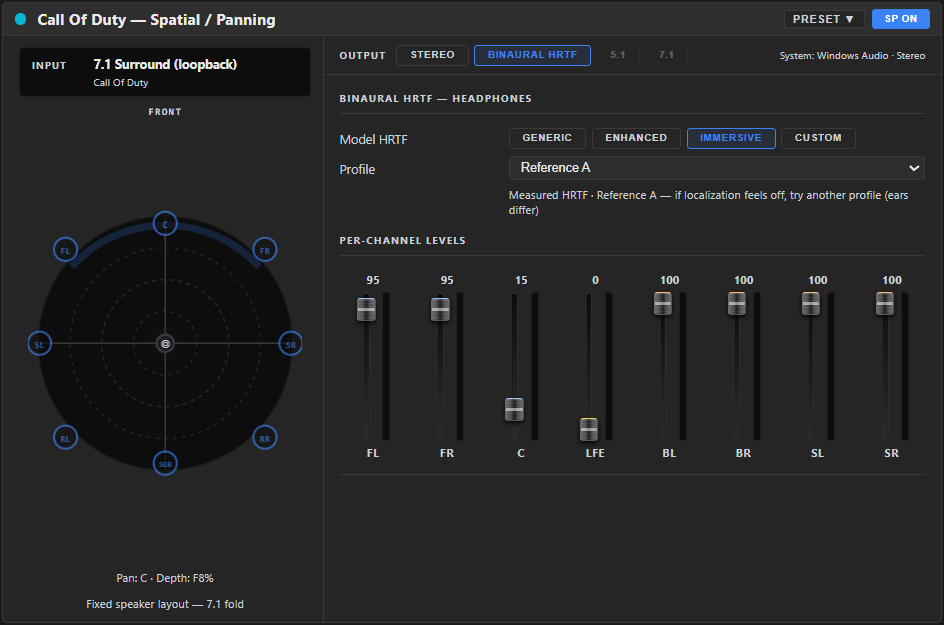
The Generic and Enhanced HRTF models are free, and so is folding a surround source to headphones. The Immersive model and Custom HRIR import (.wav / .sofa) are Premium.
Two ways to use it
- Position a source in 3D — place a mono/stereo source at a point in space around you (point-source).
- Fold surround to headphones — take a 5.1 or 7.1 source and collapse it to a convincing binaural image.
Folding a 5.1 / 7.1 game or movie
- Make sure the source actually delivers surround. In Windows, set the game or playback device to 5.1 or 7.1. If the source only sends stereo, there's nothing to fold.
- SELECT the channel → SETUP → set the channel mode to 5.1 or 7.1 Surround. A ⚠ appears if the incoming source has fewer channels than the mode expects.
- Open the SPATIAL tab → switch the mode to Binaural HRTF. The surround channels are now folded to headphones, with a per-speaker level for each (front, centre, surrounds, LFE) so you can balance the image.
Positioning a single source
On the SPATIAL tab in Binaural HRTF mode, a stereo/mono source exposes point-source controls:
- Azimuth (−180…+180°) — left/right and front/back angle.
- Elevation (−90…+90°) — above or below you.
- Distance (0.1…10 m) — how far away it sounds.
- Distance Attenuation — natural fall-off with distance.
Pick a model
Start with Generic — it works for everyone. Enhanced (still free) adds synthetic pinna cues for stronger front/back and height. For the most lifelike image, Premium adds the Immersive model (real measured profiles you can audition) and lets you import your own HRIR profile (a .wav or .sofa file) via SPATIAL → Model → Custom HRIR → IMPORT. (HRTF guide.)
This is about folding a surround source to headphones. Sending a 5.1 / 7.1 output to real multichannel hardware is a separate thing and is not available in this version.