Output Processing — Overview
ON THIS PAGE
Output buses have their own processing, applied to the summed mix rather than a single source. Where a channel asks "how should this voice sound?", a bus asks "how should this whole destination sound, and how loud?".
Select any bus (including Main L+R) and the config screen mirrors a channel's, with bus-appropriate tools.
The bus chain
(summed channels) → EQ → LIMITER → FADER → DELAY → device
- EQ — correct the destination (room, headphones), not individual sources.
- Limiter — a safety ceiling so the combined mix never clips.
- Fader — the bus's master level (on the strip).
- Delay — shifts the whole bus in time (lip-sync, speaker alignment).
The bus config screen
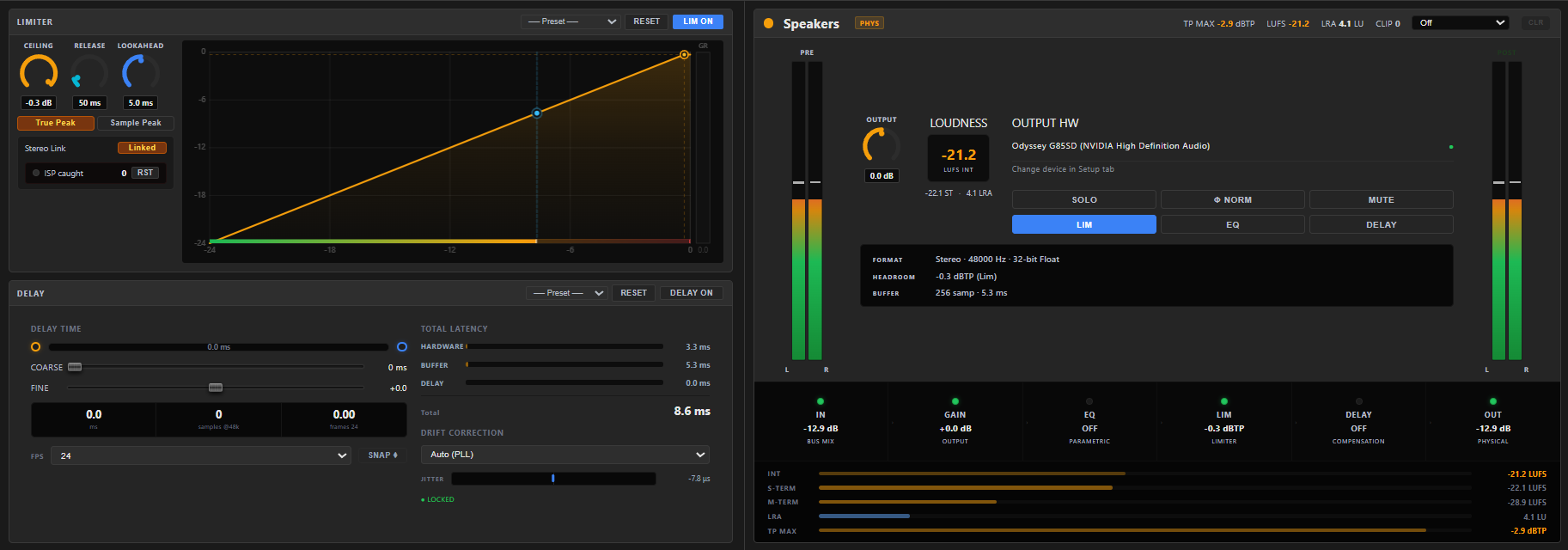
- Left panel — the bus's dynamics: LIMITER and DELAY, each with a RESET and ON switch (the counterpart of a channel's Gate + Compressor). Both are plain always-on settings with no preset picker of their own — see Limiter.
- Tabs — HOME · EQ · SENDS · SETUP.
The HOME tab
A bus overview built around level and loudness:
- PRE / POST meters — the mix before and after the bus's processing.
- OUTPUT knob (−20…+20 dB) — bus output trim.
- Loudness read-outs — live LUFS (integrated), Short-term, LRA and True Peak (TP MAX), plus a CLIP counter. A target dropdown colours the integrated value green, amber or red against a chosen loudness target, and CLR resets the readings. (LUFS metering is Premium — values read «—» on Free.)
- The Main L+R bus is badged MAIN LR and noted as the default output for all channels.
Full loudness detail: Loudness & Normalization.
Still stuck? Ask the community on Discord.