Limiter
A limiter is a brick wall for level: it lets the mix get as loud as you set, then refuses to let it go higher. On an output bus it's your safety net — when several loud channels stack up, the limiter catches the peaks instead of letting them clip.
It lives in the left panel of the bus config screen, with a RESET and an ON / OFF switch — it's a plain always-on control, the same category as Output Gain or Phase Invert, with no preset picker of its own.
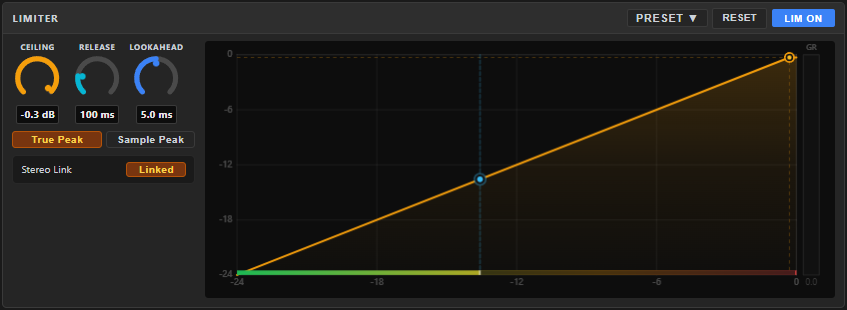
Clipping on a stream or recording is permanent — there's no fixing it afterwards. A limiter a fraction of a dB below maximum guarantees the file/stream never clips, no matter how the mix peaks.
Controls
| Control | Range | Default | What it does |
|---|---|---|---|
| CEILING | −20…−0.1 dB | −0.3 | The hard maximum. Nothing leaves the bus louder than this. |
| ATTACK | 0.1…10 ms | 0.5 | How fast the limiter clamps down on a transient. Lower catches peaks harder and faster; higher lets a little more through before it reacts. |
| RELEASE | 5…500 ms | 50 | How quickly the limiter recovers after catching a peak. |
A live gain-reduction graph shows the limiter working, alongside a Stereo Link label — left and right are always limited together here, so the stereo image stays centred (there's no unlinked mode to switch to).
A ceiling around −1.0 dB is a safe default for anything destined for streaming platforms. You normally don't want the limiter doing heavy work — it's there to catch the occasional peak, not to squash the mix.
This bus control doesn't have one — save a limiter setup as a preset on a channel's FX-insert Limiter instead, which can be saved, shared and reused via the Workshop.