Fix audio/video sync
ON THIS PAGE
If voices land before lips move, or a stream's audio runs ahead of its video, the fix is output delay — it holds a bus back by a precise amount so sound lines up with picture again. Because video pipelines (capture cards, encoders, players) almost always add their own lag, audio usually needs to wait for the video to catch up.
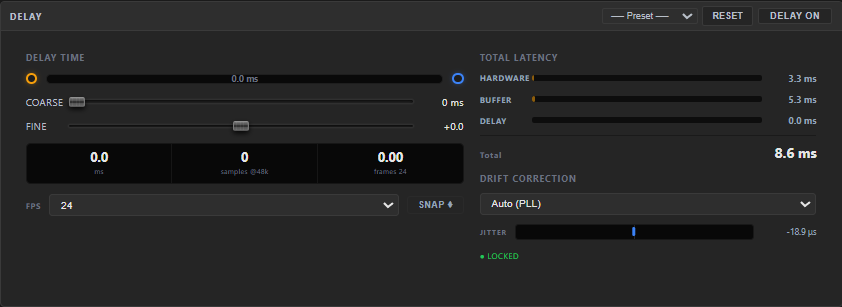
Where the delay lives
SELECT the bus you want to align → its DELAY control sits in the left dynamics panel (next to the LIMITER), with its own ON / OFF switch. It shifts everything on that bus by the time you set.
Dial it in
- COARSE (0…500 ms) — the main adjustment. Nudge it up until lips and sound agree.
- FINE (±5 ms) — small touch-ups once you're close.
- Frame readout / SNAP — the panel shows the delay in video frames at a chosen frame rate (23.976, 24, 25, 29.97, 30, 60 fps). SNAP rounds the delay to whole frames, which is how editors usually think about sync.
- Latency breakdown — a live read-out of hardware + buffer + delay = total, so you always know the real end-to-end latency you've added.
💡 Delay the right bus
If only your stream is out of sync, add delay to the Stream bus — not your monitoring bus, or you'll throw your own ears off. Each bus is independent.
A couple of realities
- Delay only adds time — it can't pull audio earlier. If your audio is behind the video, you can't fix it with delay; reduce the video path's latency instead (a lighter capture/encoder setting), or delay a competing source.
- Long sessions drifting? The bus's SETUP tab has a Drift Correction control (Auto (PLL) by default) that keeps device clocks aligned over time, so a perfect sync at the start doesn't wander an hour in. (Drift Correction.)
Still stuck? Ask the community on Discord.