What is Aura Mixer?
ON THIS PAGE
Aura Mixer is a virtual mixing console for Windows. Think of the big desks you see in recording studios or behind the sound engineer at a concert — rows of sliders, each controlling one sound source. Aura Mixer is that desk, living inside your PC, controlling every sound your computer makes or records.
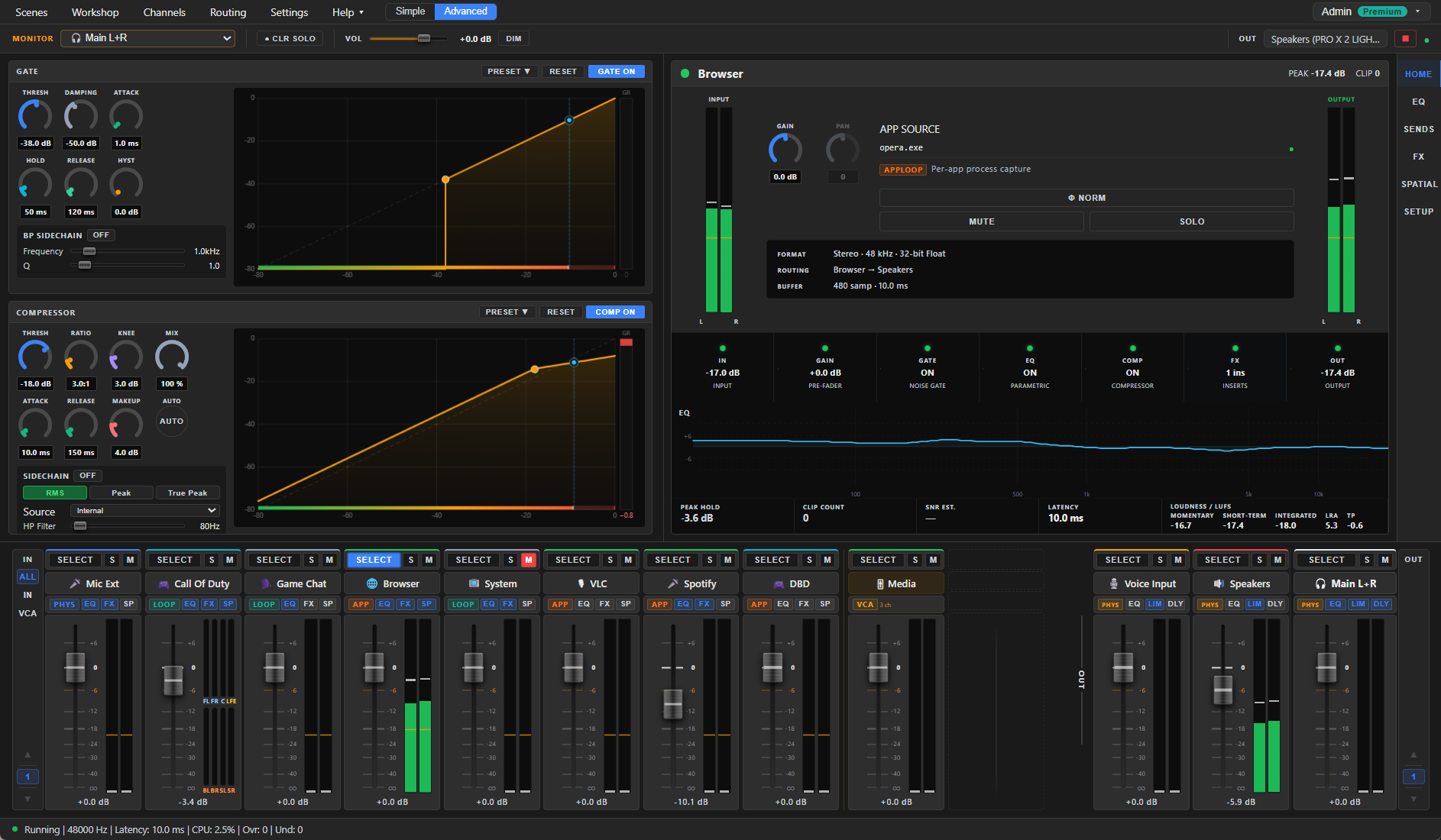
Aura Mixer has a Simple view that does most of the setup for you — your sounds on big, friendly faders, no jargon — alongside the full Advanced console described in this guide. Switch between them anytime from the menu bar. See Simple mode.
The problem it solves
On a normal Windows PC, all audio is glued together. Your game, your music, your friends on Discord and your browser all come out of one volume slider, and anything you record or stream captures the whole jumble. Want music for yourself but not for your stream? Want your mic to sound polished without buying a hardware processor? Windows alone can't do that.
Aura Mixer un-glues it. Every source gets its own channel with its own fader, and every destination gets its own output bus with its own independent mix.
What you can do with it
- Put every sound on its own fader. Microphones, line inputs, entire playback devices, or — without any virtual cable drivers — a single application like Spotify or your browser. The Free version covers a handful of channels; Premium removes the limit.
- Process audio like a studio. Each channel has a parametric equalizer (up to 12 bands), a noise gate and a compressor — plus, with Premium, a rack of insert effects: reverb, delay, de-esser, noise suppressor, pitch shifter and more.
- Build independent mixes. Route channels to multiple output buses — the Main bus plus extras (how many depends on your plan). You can hear the music; your stream doesn't. Your call hears your mic; you hear everything.
- Place sounds in space. Stereo widening tools and binaural HRTF rendering can position a sound around your head on ordinary headphones, including folding 5.1/7.1 surround sources down to convincing 3D stereo. (Stereo tools, the Generic and Enhanced HRTF models and surround folding are free; the measured Immersive model and Custom HRIR import are Premium.)
- Switch contexts instantly. Save complete mixer setups as scenes (Streaming, Gaming, Work…) and recall them with one click. Save a single processor's settings — or a channel's whole chain — as presets, and share them as files.
The Free version is a complete mixer for everyday and gaming use — core channels, EQ, gate, compressor, everyday spatial, scenes and presets. Premium lifts the channel, bus and group limits and unlocks the effects rack, advanced spatial models and loudness metering. Details: Accounts & Premium.
HRTF (head-related transfer function) is a mathematical model of how your head and ears shape incoming sound. It's what lets headphones fake true 3D positioning. You'll meet it again in the Spatial section.
Who it's for
| You are… | Aura Mixer gives you… |
|---|---|
| A streamer | A separate mix for your audience: alerts and game audio in, copyrighted music out. |
| A podcaster / creator | A clean, compressed, gated microphone chain — no hardware channel strip needed. |
| A gamer | Game, voice chat and music on separate faders, plus virtual surround on headphones. |
| Working remotely | Calls at a sane volume while music ducks quietly underneath, every app under control. |
How it thinks — the console metaphor
Aura Mixer borrows its layout straight from hardware consoles, because that layout has survived fifty years for a reason:
- Input channels (left) — one vertical strip per source: fader, mute/solo, level meters.
- VCA groups (middle) — "group faders" that move several channels at once without rewiring anything (a Premium feature).
- Output buses (right) — one strip per destination: your headphones, your speakers, a virtual cable into OBS or Discord. The Main L+R bus is your default master output.
If you've ever used a physical mixer, you'll feel at home in minutes. If you haven't — the Interface Tour walks you through every piece.
Under the hood (the short version)
- Runs on WASAPI, the modern Windows audio system — no extra drivers to install.
- The audio engine works at a fixed 48,000 Hz / 32-bit float, the same internal quality used by professional software.
- Default latency is about 10 ms — low enough that you can monitor your own voice without an echo feeling.
That's all the theory you need for now.