Compressor
ON THIS PAGE
A compressor evens out volume: it turns down the loud moments so the quiet ones can sit higher, making a source sound steadier, fuller and more "produced". On a voice it's the difference between lurching levels and a confident, consistent presence.
Reach for it when:
- your levels lurch between too-quiet and too-loud and you want a steadier, more consistent sound;
- you're after that polished, "produced" voice character rather than raw, unprocessed dynamics.
Above a set level (the threshold), the compressor reduces gain by a ratio. 4:1 means for every 4 dB the input rises past the threshold, the output rises only 1 dB. Then you make up the lost loudness with makeup gain.
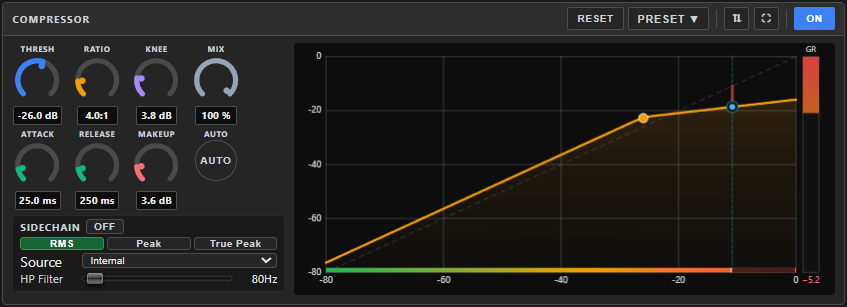
Where it lives
The Compressor is one of the two system nodes that always ride along with an input channel — it's never added or removed, just switched ON/off. It lives in the config screen's left dock, by default in the dock's right slot, alongside the Noise Gate in the left slot — though either slot can be pinned to any processor on the channel.
Reading the panel
A live gain-reduction graph shows how much the compressor is pulling the signal down at any moment — the more it's working, the further the reading moves.
Need more room? ⛶ in the header maximizes the panel to full dock height.
Controls
| Knob | Range | Default | What it does |
|---|---|---|---|
| THRESH | −60…0 dB | −18 | The level above which compression begins. Lower = more of the signal gets compressed. |
| RATIO | 1…20 : 1 | 4 | How hard. 2–4:1 is gentle/vocal; 8:1+ is heavy. |
| KNEE | 0…20 dB | 3 | How abruptly compression starts at the threshold. Soft (higher) = smoother, more natural. |
| MIX | 0…100 % | 100 | Blend of compressed vs original — below 100 % gives parallel compression (added density without fully squashing the dynamics). |
| ATTACK | 0.1…200 ms | 10 | How fast it clamps down. Fast tames transients; slow lets them punch through. |
| RELEASE | 10…2000 ms | 150 | How fast it lets go. Too fast can "pump"; too slow stays ducked longer than it needs to. |
| MAKEUP | 0…24 dB | 0 | Adds back the level lost to compression. AUTO estimates a sensible value for you. |
Detection & sidechain
These live behind the vertical SIDECHAIN tab on the left edge of the panel — click it and they slide out over the dials, click it again to put them away; the graph stays visible the whole time.
- Detection mode — RMS (smooth, loudness-like — good for vocals), Peak (catches fast transients), or True Peak (oversampled, strictest).
- Sidechain — toggle ON to drive compression from a Source (Internal or External) rather than the channel itself, with an HP Filter (20–2,000 Hz, default 80) so bass energy doesn't trigger unwanted pumping.
A good starting point
- Switch the compressor ON, RATIO 3:1, KNEE soft (~6 dB), detection RMS.
- Lower THRESH until the gain-reduction graph shows ~3–6 dB of reduction on your loudest words.
- ATTACK ~10 ms (keeps consonant punch), RELEASE ~150 ms (or use a faster release for a tighter sound).
- Click AUTO makeup, then fine-tune to match the bypassed level.
If it sounds wrong
| You hear… | Try… |
|---|---|
| A "pumping" or breathing quality | Lengthen RELEASE, or raise KNEE for a softer transition. |
| Transients (consonants, plucks) get squashed | Lengthen ATTACK slightly to let them through before compression grabs. |
| The compressed sound feels lifeless or over-squashed | Raise RATIO less, or lower MIX for parallel compression instead of full squash. |
| Overall level dropped after compressing | Raise MAKEUP, or click AUTO. |
Presets, bypass and reset
- PRESET ▾ in the panel header applies a saved setup, or saves the current one under a name. Once one is applied the header shows Preset: name — see Knowing what preset is applied. The same settings can also ride inside a pack.
- ON / OFF bypasses just this node.
- RESET returns every knob to its default (asks to confirm).
Related
- Noise Gate — the dock's other default slot; cuts silence rather than evening out level.
- Limiter — a hard ceiling for the loud outliers a compressor lets through, rather than a general evening-out.
- Loudness Equalization — a multi-band alternative aimed at loudness comfort across the whole spectrum, rather than general tone-neutral dynamics control.
- Effects Rack — the FX chain this channel's Compressor is a fixed part of.