Audio mixer for Windows 10 & 11 Public beta v0.7.1-beta

One app for everything you hear and say.

Built for streamers, content creators, and competitive gamers.

Give OBS its own clean mix, keep Discord and music off your stream, hear every footstep, and make your mic sound clean and even — all in one window.

Mix. Shape. Place. Control.

Questions or tips? Chat with us on Discord

Why people choose Aura Mixer

  • Free to start

    No account, no card — the free version stays free.

  • Anti-cheat safe

    Nothing is injected into your games.

  • Stays in sync

    Low latency — what you hear matches what you see.

  • Yours, offline

    No subscription, and it works without the internet.

Who it's for

Built for streamers, content creators and competitive gamers.

One app, three ways to use it. Pick your setup — whether you stream with OBS, record videos and podcasts, or play ranked and need every footstep.

For streamers

A streamer audio setup with OBS audio routing built in

The problem: Your viewers shouldn't hear your music or your private Discord call — but you need both in your headphones.

A separate mix for OBS
OBS captures its own mix while your headphones get another — no virtual cable between Aura Mixer and OBS.
Choose what viewers hear
Keep Discord and music out of the stream, and sit the game under your voice for viewers only.
Hear your stream before you go live
One click switches your headphones to the stream mix, so you hear exactly what your viewers hear.
A clean microphone
A noise gate, EQ and compressor give you a clean, even voice — no keyboard clatter or fan hiss between sentences.

A second mix is included in Free; separate Stream, Recording and Discord mixes are Premium.
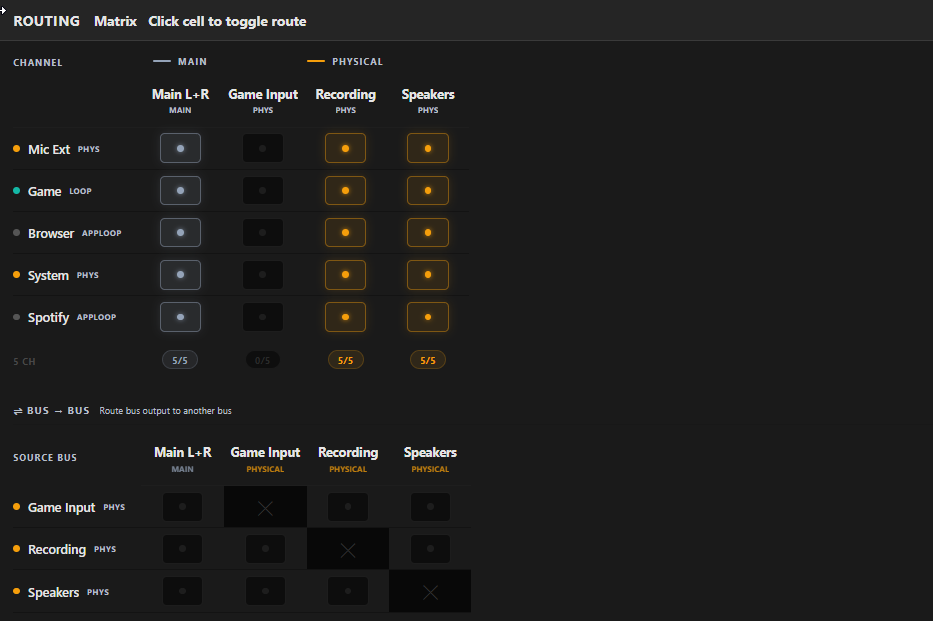
Aura Mixer's routing matrix — one microphone routed to both the Main L+R bus and a separate Recording bus at once, so you can send a completely different mix to each.

For content creators

An audio mixer for content creators: clean voice, finished mix

The problem: Recording videos, tutorials or a podcast means a noisy room, uneven levels and a separate tool for every fix.

Record straight to a file
Save exactly what a mix sounds like — voice, game and music as one finished track — with no extra recording app. Free.
No room noise, no harsh S sounds
A noise gate, noise suppression and a de-esser clean your voice before it is recorded (the gate is Free; the other two are Premium).
The same loudness every time
Loudness metering keeps every upload at the level platforms expect, without exporting twice (Premium).
Sound effects and ready-made voice chains
Trigger stingers and effects with a key, and load a tuned voice chain in one click (soundboard is Premium).
A Recorder bus: a live waveform with record, pause and stop controls, a loudness readout in LUFS, pre- and post-fader level meters and a chain strip showing EQ, limiter and delay.

For competitive gamers

Footstep EQ and 3D audio for competitive FPS

The problem: In a ranked match the quiet cue — a footstep, a reload — gets buried under gunfire and explosions.

Footstep EQ
Lift the range where footsteps live on your game while you play — no config files, no restarts.
Quiet sounds, louder
Pull quiet footsteps up without letting gunfire and explosions blow past them.
3D audio on headphones (basic profile free)
Hear which way a footstep is coming from on ordinary stereo headphones — no extra programs.
Low latency
Sounds stay in sync with the picture, without crackles on everyday hardware.
Anti-cheat safe
Nothing is injected into your game — it works with standard Windows audio, the way the Volume Mixer does.
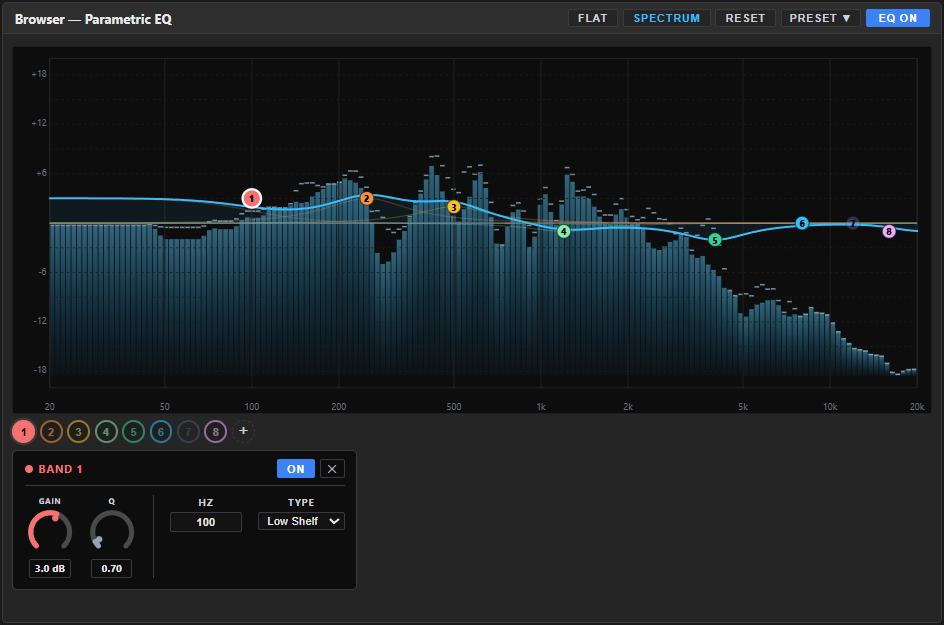
The parametric EQ: numbered band handles on the frequency curve over a live spectrum, with gain, Q, frequency and filter-type controls for the selected band.

For power users & audio enthusiasts

A VoiceMeeter alternative with the whole console in one window

The problem: VoiceMeeter plus an EQ program, its interface and a 3D-audio add-on is four programs to keep alive through the next Windows update.

Up to 32 channels and 16 mixes (Premium)
Send anything anywhere from one routing grid, and move groups of channels with a single fader.
15 effects per channel (Premium)
Chain a de-esser, reverb, delay, Loudness EQ and more on any channel.
Scenes · hotkeys · automation
Switch from "just chatting" to "ranked" with one key, or let a rule duck music when you talk.
Presets and Workshop packs
Save your own presets, share them as files, and load tuned packs from the Workshop in one click.

Honest limit: if you rely on VBAN network audio or a rack of hardware interfaces, VoiceMeeter still covers that.

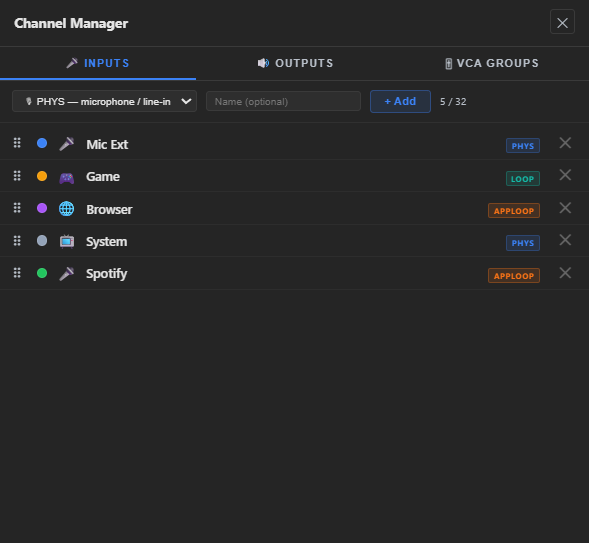
Aura Mixer's Channel Manager — every input and output in one list, from microphones to single apps and whole devices, with groups for controlling several channels at once.
Feature set

One Windows audio mixer for gaming and streaming.

Everything a streamer audio setup or a competitive-gaming mix needs, in one window. Each feature is here because it replaces something you'd otherwise patch together from three other programs.

Aura Mixer's parametric EQ panel — a multi-band response curve over a live spectrum analyzer, per-band gain/Q/type controls, and a presets list.

Mixer · EQ

Per-app volume and a 12-band EQ on every channel

Separate faders for Discord, your game, music and mic — and a full parametric EQ on each, adjusted in real time while you play.

  • Make footsteps easier to hear in a match
  • Tame a harsh mic for your stream
  • No config files, no restarts

12 bands on every channel · free

EQ guide
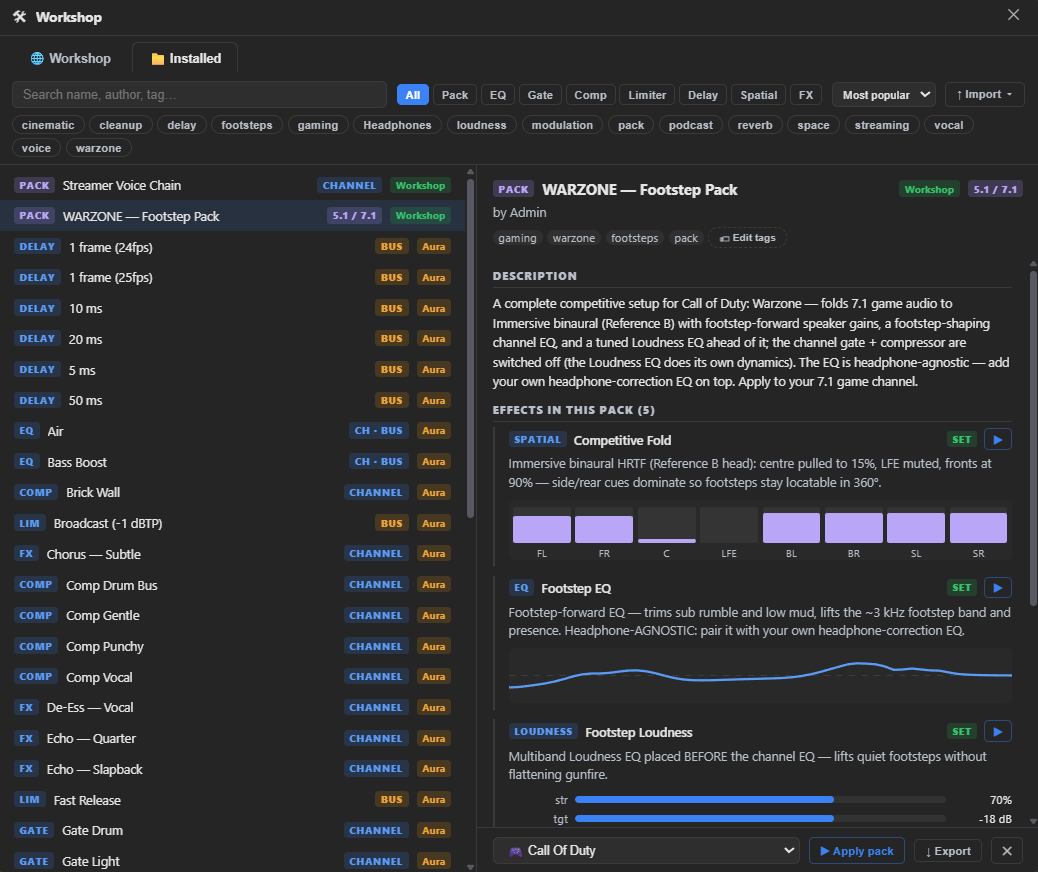
The Workshop window — a searchable library of community presets and packs on the left, a WARZONE Footstep Pack detail on the right showing its spatial, EQ and loudness stages, with an Apply-to-channel picker.
Available

Workshop

One-click packs for your game and your voice

A built-in library of presets and ready-made packs. A single WARZONE pack sets up 3D audio for headphones, a footstep EQ and loudness in one go.

save, share and apply in one click

How the Workshop works
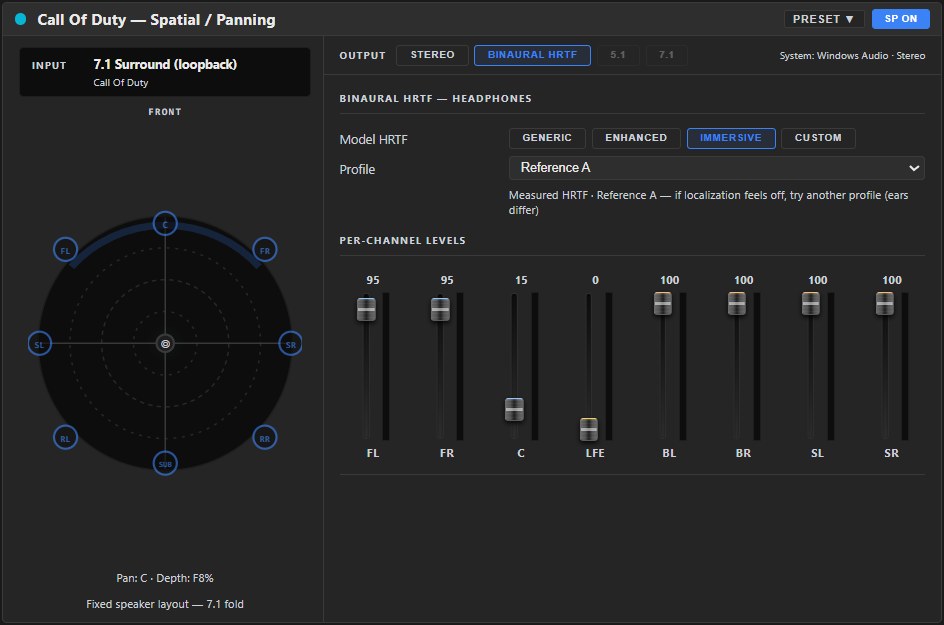
Aura Mixer's spatial panel showing HRTF binaural output for a first-person shooter, with per-channel surround levels and a directional pan dial.

Spatial audio

3D audio for headphones, built in

Turn a game's surround sound into 3D audio on ordinary headphones, and find the profile that suits your ears with a built-in test — no extra programs.

basic profile free · calibrated profiles and the test: Premium

Spatial audio guide
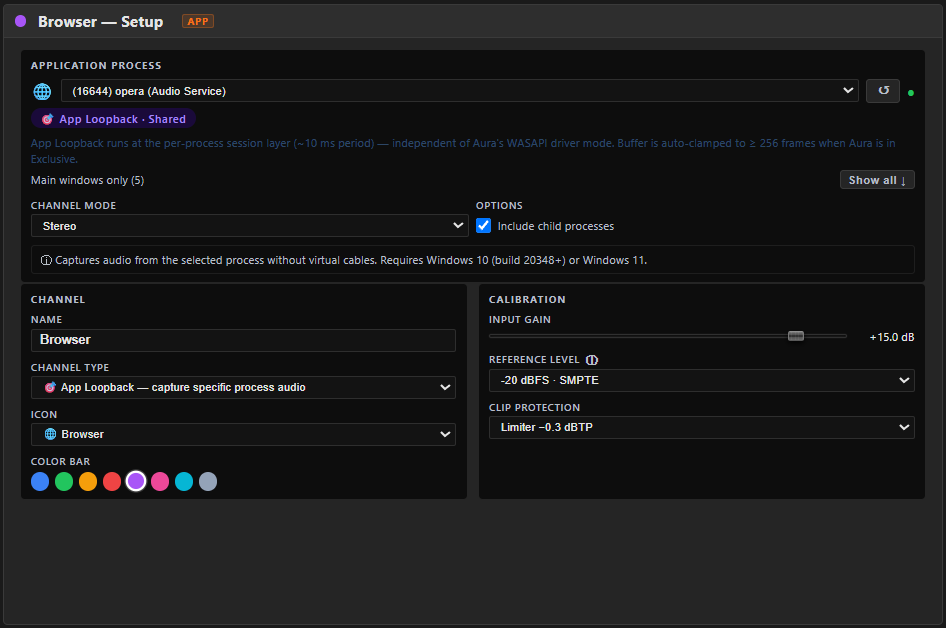
The channel setup for an app-loopback channel: a process picker listing the browser, options to include child processes, and a note that capture needs Windows 10 build 20348 or Windows 11.

App capture

Any app becomes its own channel

Pick Spotify, a browser or your game and it gets its own fader, EQ and destination — with nothing injected into the app.

free · up-to-date Windows 10 or Windows 11

Capture a single app
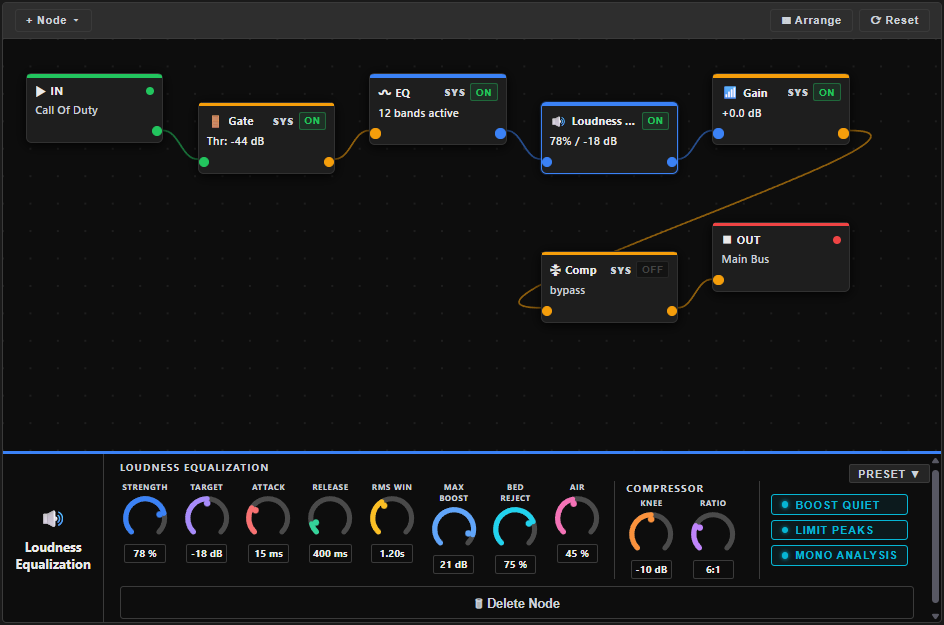
The FX chain editor: nodes for input, gain, de-esser, gate, EQ, compressor and output joined by cables, with Add Node, Arrange and Reset buttons.
Premium

FX rack · loudness

Effects and loudness for finished audio

Add a de-esser, noise suppression, reverb, Loudness EQ and more to any channel, then check your loudness before you publish.

15 effects · loudness metering and leveling

FX rack guide
Aura Mixer in Simple mode: six channel cards for a microphone, a game, a browser, voice chat, a soundboard and Spotify, each with gate, compressor, EQ and effects sections and a fader, beside a media tray with sound pads and an outputs rack.

Simple · Advanced

Simple when you start, Advanced when your setup grows

Start in Simple mode, where each channel is one card with its noise gate, compressor and EQ within reach. Switch to Advanced when you want every setting.

switch any time — nothing is lost

Simple mode guide
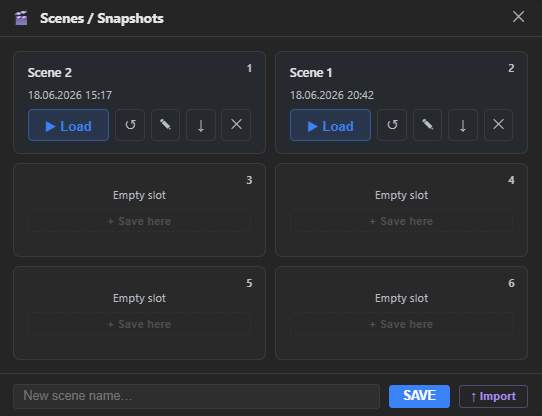
The Scenes window: a list of saved scenes on the left; on the right the selected scene's channels and outputs, notes, and Load, Overwrite, Export and Delete buttons.

Scenes · hotkeys

A scene for every kind of session

Save your mixer as a scene — just chatting, ranked, podcast — and switch with a hotkey, without alt-tabbing out of the game.

20 scenes · hotkeys · automation rules

Scenes guide
How it works

How it fits your setup.

Everything you hear comes in, gets mixed and cleaned up, and goes exactly where you want it — your headphones, your stream, your call or a recording.

WHAT YOU HEAR AND SAY WHERE IT GOES YOU STAY IN CONTROL Microphone your voice Game its own fader Discord voice chat Music & apps Spotify · browser Aura Mixer one window for all of it Mix a fader for everything Clean voice gate · EQ · compressor Footstep EQ hear every step 3D audio for headphones Loudness even on every upload Headphones what you hear OBS · stream what viewers hear Discord what friends hear Recording a finished file Hotkeys one key Scenes whole setups Automation simple rules
  1. What you hear and say Microphone · game · Discord · music & apps
  2. Aura Mixer A fader for everything · clean voice · footstep EQ · 3D audio · even loudness
  3. Where it goes Your headphones · your stream · Discord · a recording — each with its own mix
  4. You stay in control Hotkeys · scenes · automation
Hover, focus or tap a block to see what it does for you.

Discord without echo

Hear your friends, let them hear you — and not your stream or your music.

Step-by-step guide

Surround on headphones

Turn a game's surround sound into 3D audio on ordinary headphones.

Step-by-step guide
Switching

A VoiceMeeter alternative for streaming and FPS gaming.

If your audio chain is VoiceMeeter plus Equalizer APO, Peace and HeSuVi, this is what changes — and what doesn't.

01 · Cable maze

The virtual-cable maze

VB-Cable, VBAN, Banana input routing, phantom devices in Device Manager. When one link breaks, the stream goes silent.

With Aura Mixer: apps are captured natively and a bus can reach OBS as its own source — no virtual cable between Aura Mixer and OBS.

02 · Four programs

Four programs for one job

VoiceMeeter for routing, Equalizer APO for filters, Peace for the interface, HeSuVi for spatial audio: four configurations and four tray icons.

With Aura Mixer: mixer, EQ, voice processing and 3D audio in one window.

03 · Update roulette

A stack that breaks at the worst moment

A pile of drivers and filter hooks has many places to fail after a Windows update — usually right before a stream or a match.

With Aura Mixer: one app that does all of it, using what Windows already provides instead of hooks and add-ons.

Aura Mixer compared with VoiceMeeter, Equalizer APO with Peace, and HeSuVi
FeatureAura MixerVoiceMeeterEQ APO + PeaceHeSuVi
Per-app volume & EQ in one window Strong: native, per channel Partial: via routing strips Partial: EQ only, no per-app mixing Partial: spatial only
A separate mix for OBS Strong: Application (capture) bus Partial: virtual outputs + routing Weak: no Weak: no
Bus-to-bus routing matrix Strong: yes, with a node-graph view Strong: yes Weak: no Weak: no
Latency Strong: low — stays in sync with the gamedepends on driver modelow, but no mixingdepends on your setup
Parametric EQ Strong: 12 bands on every channel Partial: basic Strong: full Partial: profiles
Footstep & game presets Strong: Workshop packs, one clickmanualmanualmanual
3D audio for headphones Strong: built in Partial: needs a plugin Strong: via HeSuVi Strong: yes, its core job
Network audio (VBAN) Weak: not supported Strong: yes——
Price Strong: free during the open betadonationwarefreefree

The honest version: if you rely on VBAN network audio or a rack of hardware interfaces, VoiceMeeter still covers that. For per-app mixing, a separate stream mix, footstep EQ and spatial audio in one window, that is what Aura Mixer is built for.

Pricing

Free for everyday mixing. Premium for the full studio.

Two plans, no subscription — you buy software, you own software. Free covers per-app control for gaming and a basic stream mix; Premium unlocks the full studio for streamers and creators.

Free

$0no email · no account

Everyday per-app control for gaming, and a basic stream mix.

  • per-app & device volume control
  • 4 channels · 2 buses (one for OBS)
  • gate · 12-band EQ · compressor
  • routing matrix & graph
  • Generic & Enhanced HRTF · 7.1 fold-down · stereo tools
  • Recorder · 20 scenes · Workshop packs · 4 hotkeys
  • FX rack · VCA · LUFS
  • advanced spatial

Premium

free in beta

$0free · open beta

The full studio for streamers and creators — free while the open beta runs.

  • everything in Free, plus:
  • 32 channels · 15 buses + Main L+R · 8 VCA
  • 15-effect FX rack, incl. Loudness EQ
  • advanced spatial · calibrated profiles · your own HRIR
  • LUFS metering + normalization
  • Soundboard · Player · Generator
  • Automation · unlimited hotkeys
  • no subscription. no rug-pull. ever.

Register, confirm your email, and your beta key is issued instantly.

Premium is free during the open beta — no card, no subscription. Paid Premium comes later.full license comparison →

FAQ

Questions streamers and gamers ask first.

Does it replace VoiceMeeter?

For most gaming and streaming setups, yes: per-app mixing, a bus-to-bus routing matrix, parametric EQ, dynamics and spatial audio in one window. VoiceMeeter's remaining edge is VBAN network audio and very hardware-heavy broadcast rigs — if you depend on those, keep it.

Aura Mixer vs VoiceMeeter
How do I set up OBS audio routing without a virtual cable?

Add an output bus, set its type to Application (capture), and route your mic and game to it — leave music and Discord off it. In OBS add an Application Audio Capture source and pick the Aura Mixer bus window. OBS then gets its own mix with no virtual cable between the two. Sending one app's audio away from your headphones can still use an optional cable until Aura Mixer's own driver ships.

Stream with OBS — full guide
Can I split Discord and music from my game audio?

Yes. Every source is its own channel with its own fader, and every bus is its own mix. Send Discord and music to your headphones only, send the game and your mic to the stream bus, and trim levels per destination with per-bus sends.

Discord voice setup
What is footstep EQ?

It lifts the 2–4 kHz range where footsteps live, usually while trimming bass, so quiet cues stand out over gunfire and explosions. It is ordinary equalisation — the tool audio engineers have used for decades — applied to the sound you hear on your own PC. Aura Mixer ships it as a Workshop pack so you don't have to tune it by hand.

How the Workshop works
Is it safe? Will EAC / BattlEye / Ricochet flag it?

Aura Mixer works with standard Windows audio — the same way Windows itself plays and records sound. It never injects code into a game and never hooks into a game, which is what anti-cheat systems look for, so it is built to be anti-cheat safe. It is about as invasive as the Windows Volume Mixer.

Will it add delay to my audio?

Not so you'd notice: the delay is low enough that what you hear stays in sync with the game and your voice stays in sync with your stream. The default setting is tuned to run without crackles on everyday hardware, and one setting lets you trade a little delay for extra stability on an older PC.

More about performance
What if you shut down the project?

Your license key is verified cryptographically offline — it doesn't call home. Even if our servers disappear tomorrow, your copy of Aura Mixer works forever. This is by design, not a promise.

Do I get free updates?

Yes — every update within your major version is free. Buy v1.x and all 1.x updates are included at no extra cost. A future major version (e.g. v2.0) may be a separate purchase, offered to existing owners at a loyalty discount. Your license is perpetual and verified offline, so the version you own keeps working no matter what.

What's your refund policy?

14 days, no questions asked. If Premium isn't for you, email us within 14 days of buying and we'll refund you — no forms, no interrogation. We'd rather you be sure. The Free tier keeps working either way.

Get Aura Mixer

A cleaner stream mix and clearer footsteps — in one install.

Aura Mixer is in open beta. Download the free version now, or register for a free beta key that unlocks the full studio.

Windows 10/11 · x64 · free premium key while the beta runs.

An unhandled error has occurred. Reload 🗙

Rejoining the server...

Rejoin failed... trying again in seconds.

Failed to rejoin.
Please retry or reload the page.

The session has been paused by the server.

Failed to resume the session.
Please retry or reload the page.